
Controls
Every action has a key and a controller button. The controller plays like a shooter: the left stick moves, the right stick turns the camera, L2 aims, R1 attacks and R2 is the heavy blow.
Holding L1 gives the face buttons, R1, R2 and the d-pad a second set: your arts and element moves 1 to 6, bandages, the map, riding and building. With a window open, the d-pad moves through it, ✕ picks and ○ closes it. Button pictures in the game follow the pad you use: PlayStation, or Xbox when an Xbox pad is plugged in. Press F1 or Create in the game for this list.
Moving and looking
| Action | Mouse and keyboard | Controller (PS5) |
|---|---|---|
| Move | W A S D or arrow keys, or click the ground | Left stick (all the way runs) |
| Sprint | Hold Shift | L3 (lasts while you keep moving) |
| Jump, swim up | Space | ✕ |
| Dodge, dive (hold) | C | ○ |
| Look, turn the camera | Drag with the right mouse button | Right stick |
| Aim | Right mouse (in first person) | Hold L2 |
| Change view | F5 | Touchpad tap |
| Hide | J | L3 while standing still |
Doing things
| Action | Mouse and keyboard | Controller (PS5) |
|---|---|---|
| Use, talk, loot, gather, mend | G, or click the thing | □ |
| Build mode | B | L1 + d-pad up |
| Crafting | O | The pause menu: Craft |
| Anvil (salvage and reforge) | U | The pause menu: Craft, then Salvage |
| Ride, get off | R | L1 + d-pad right |
| Tame, pets | T, Y | The pause menu: Settings, then Game; Gear, then Pets |
| Track, spirit speak | N, V | "Use" in the skills window |
| Music: calm, provoke, discord | 7 8 9 | Skills window, or the instrument |
| Map | M | L1 + d-pad down |
Fighting
| Action | Mouse and keyboard | Controller (PS5) |
|---|---|---|
| Attack the nearest or chosen foe | F, or click a foe | R1 |
| Next enemy | Tab | R3 |
| Heavy attack | Ctrl | R2 |
| Arts and element moves 1 to 6 | 1 to 6 | L1 + □ ✕ ○ △ R1 R2 |
| Ultimate | ` | L1 + R3 |
| Healing potion | Q | △ |
| Bandage | H | L1 + d-pad left |
On screen
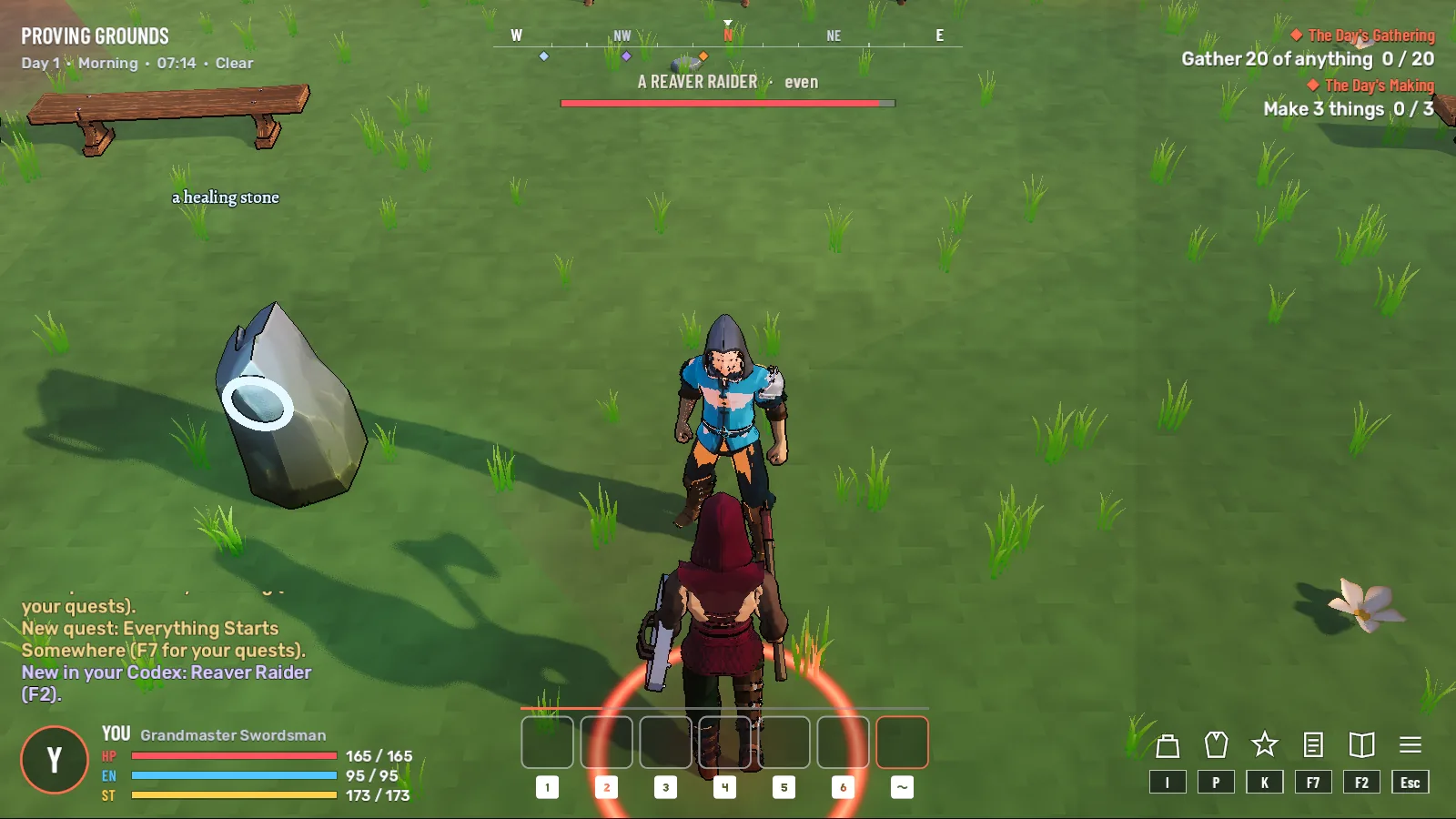
Top left: where you are, the day, the hour and the weather, with short notices under them that fade. Top centre: a thin compass, and in a fight your target’s name and health. Top right: the quests you follow. Bottom left: you, with your health, energy and stamina. Bottom centre: your hotbar under the fury line. Bottom right: shortcuts to the menus, each with its key (hidden when you play on a controller). When your health drops under a third, the screen’s sides glow red. There is no minimap: reading the land is the Cartography skill and the map you carry (M).
The pause menu
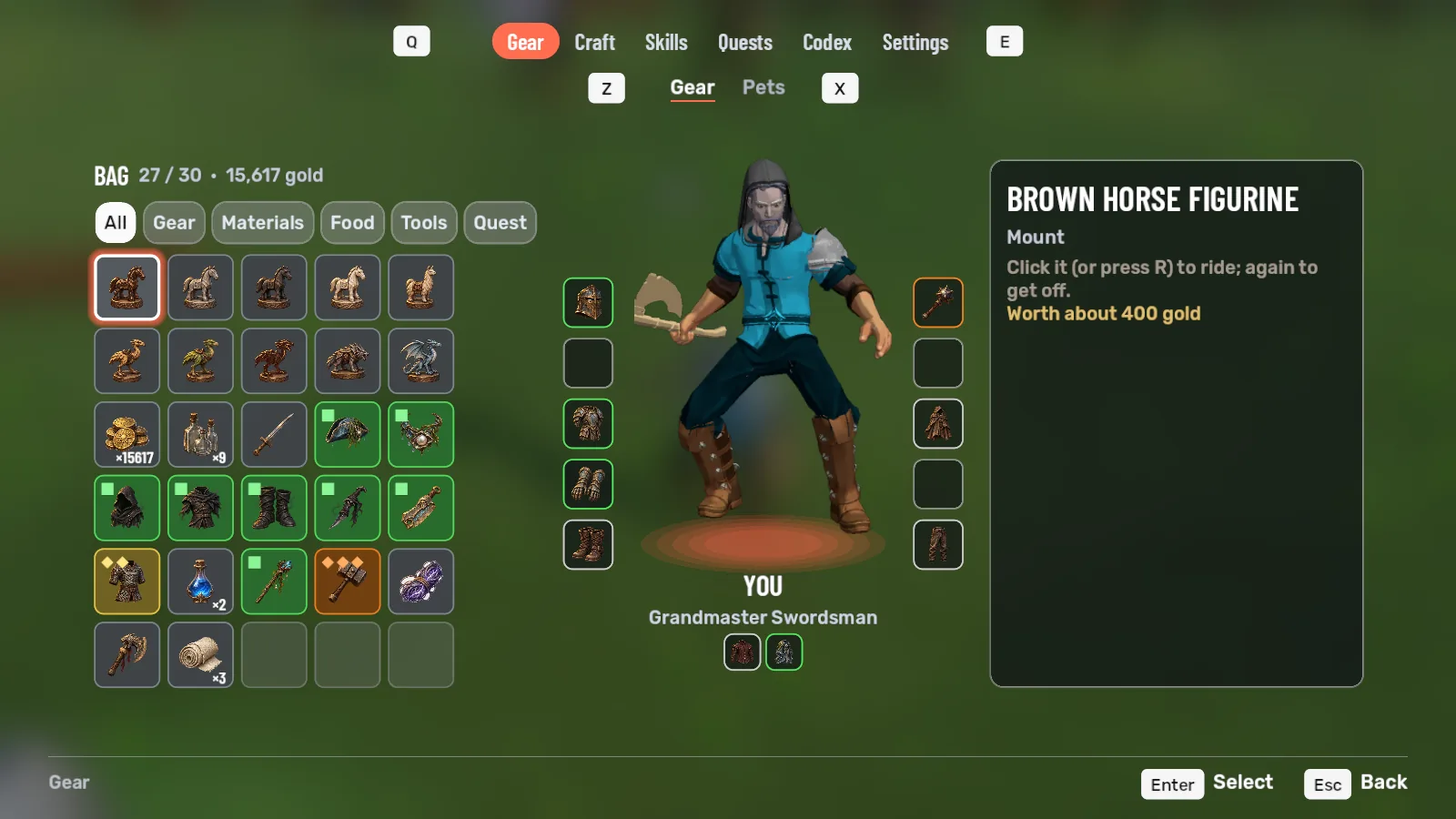
Everything else lives in one menu. The world blurs behind it, and tabs run along the top: Gear, Craft, Skills, Quests, Codex and Settings. Each tab has its parts under it: Gear and Pets; Craft and Salvage; Skills, Trees, Arts and Elements; Settings and Game, where saving and quitting are.
| Action | Mouse and keyboard | Controller (PS5) |
|---|---|---|
| Open the menu where you left it | F9 or Esc | Options |
| Next or last tab | E / Q | R1 / L1 |
| Next or last part of a tab | X / Z | R2 / L2 |
| Gear | I or P | d-pad down or left |
| Skills | K | d-pad right |
| Elements | X | d-pad up |
| Quests / Codex | F7 / F2 | From the menu |
| Craft / Salvage | O / U | From the menu |
| Pets | Y | From the menu |
| Close it | Esc, or right-click the world | ○ or Options |
On the Gear tab your bag is a wall of cards, five to a row, each on its rarity’s colour, with filters for gear, materials, food, tools and quest things. You stand in the middle with your ten worn slots either side, and the thing you chose shows on the right, next to what you wear now. Press a card once to choose it and again to use it; press a worn slot to take it off.
Esc backs out one layer at a time: aiming, then open windows, then work in progress, then your target, and then it opens the menu. Build mode has its own keys; see Building.
Settings
- Stick dead zone from 5% to 80% (25% to start), look speed from 30% to 200%, and vibration on or off.
- Hints and prompts show controller words once you use the pad, and key words again when you move the mouse.
- Screen edge: how far from the edge of the screen everything sits, from 16 to 96 pixels, for TVs that cut off their edges. Text can be made up to twice as big.
- Changing keys and buttons. Coming
- Direct controller buttons for fighting arts, skill trees, crafting, taming and pets. For now these are in the pause menu. Coming